Electrostatic discharge from the human body, the environment, or even inside electronic equipment can cause various types of damage to delicate semiconductor chips, such as: penetrating the thin insulation layers inside components; destroying the gates of MOSFETs and CMOS devices; latching up flip‑flops in CMOS devices; shorting reverse‑biased PN junctions; shorting forward‑biased PN junctions;
Electrostatic discharge from the human body, the environment, or even inside electronic equipment can cause various types of damage to delicate semiconductor chips, such as: penetrating the thin insulation layers inside components; destroying the gates of MOSFETs and CMOS devices; latching up flip‑flops in CMOS devices; shorting reverse‑biased PN junctions; shorting forward‑biased PN junctions; and melting internal bonding wires or aluminium traces in active devices. To eliminate the interference and damage caused by electrostatic discharge (ESD) to electronic equipment, multiple technical measures must be adopted.
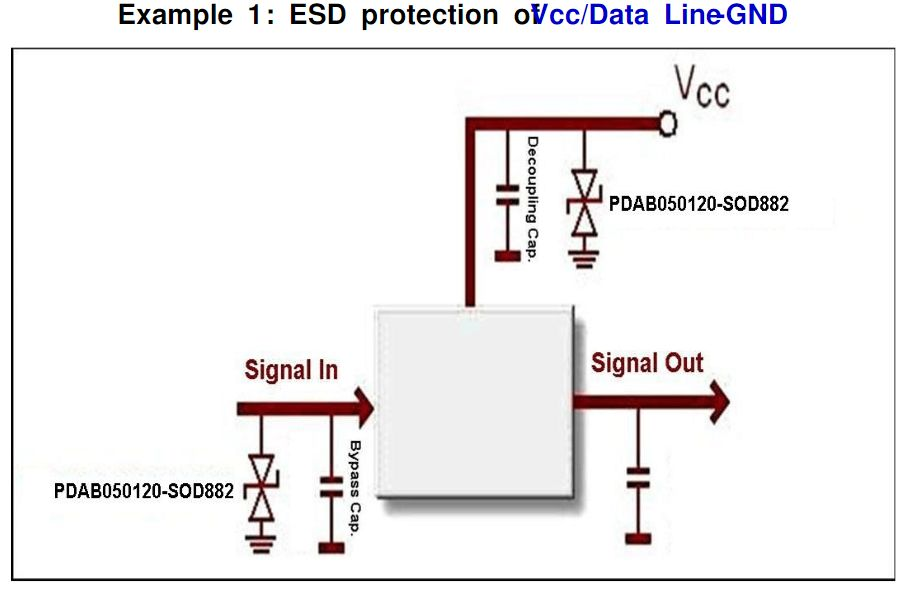
In PCB design, ESD‑hardened design can be achieved through layer stacking, appropriate placement and routing, and mounting. During the design process, most design modifications can be limited to adding or removing components through prediction. By adjusting PCB layout and routing, ESD can be effectively mitigated. The following are some common preventive measures.
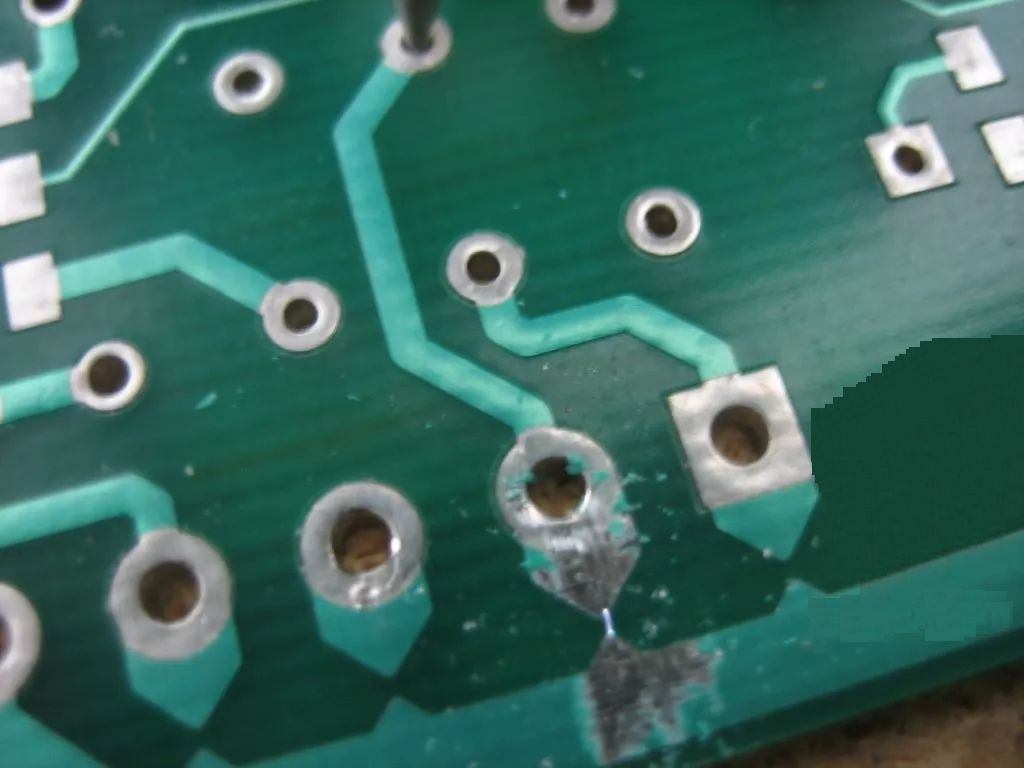
Several typical general ESD protection circuits
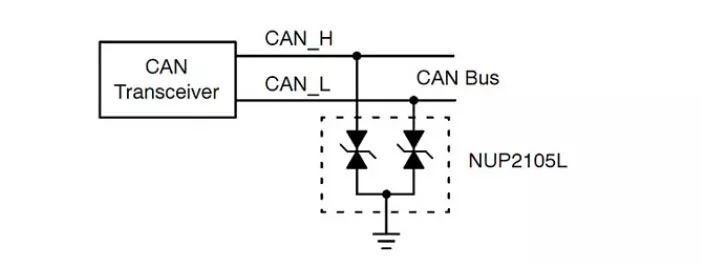
CAN Bus protection
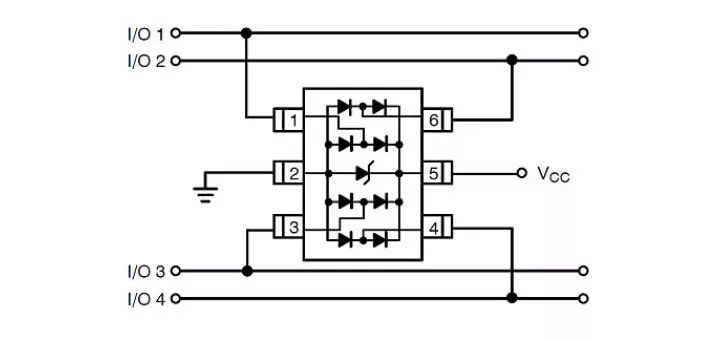
Data line and interface protection
Sharing personal 9 major measures for ESD protection
Recently, I have been conducting ESD testing on electronic products. From the test results of different products, I have found that ESD is a very important test: if the circuit board is not well designed, the introduction of static electricity can cause the product to crash or even damage components. Previously, I only noticed that ESD could damage components, but I did not realise that it also requires sufficient attention for electronic products as a whole.
ESD, or Electro‑Static Discharge, is a natural phenomenon usually generated through contact, friction, or induction between electrical appliances. Its characteristics are long‑term accumulation, high voltage (up to several thousand or even tens of thousands of volts), low charge, small current, and short duration. For electronic products, if the ESD design is not adequate, it often leads to unstable operation or even damage.
Two methods are commonly used in ESD discharge testing: contact discharge and air discharge.
Contact discharge means discharging directly to the device under test; air discharge, also called indirect discharge, is generated by the coupling of a strong magnetic field to adjacent current loops. The test voltages for these two methods are generally 2 kV to 8 kV, varying by regional requirements. Therefore, before designing, it is necessary to clarify the target market for the product.
The above two situations are basic tests performed to simulate the failure of electronic products when a human body carrying static electricity comes into contact with them.
Humidity varies around the world, but even in the same region, different humidity levels generate different amounts of static electricity. Collected data show that static electricity increases as air humidity decreases. This indirectly explains why, in northern winters, the static sparks from taking off a sweater are so large. “Since static electricity is so harmful, how can we protect against it?” In practice, we usually take a three‑step approach: prevent external charges from flowing into the circuit board and causing damage; prevent external magnetic fields from damaging the circuit board; and prevent damage from electrostatic fields.
In actual circuit design, we typically use one or more of the following methods for ESD protection:
1. Use avalanche diodes for ESD protection
This is a commonly used method in design. The typical approach is to connect an avalanche diode in parallel to the critical signal line to ground. This method takes advantage of the fast response and stable clamping capability of avalanche diodes, which can dissipate the accumulated high voltage in a short time, thereby protecting the circuit board.
2. Use high‑voltage capacitors for circuit protection
This practice usually places ceramic capacitors with a withstand voltage of at least 1.5 kV at the I/O connectors or critical signal locations, with connections kept as short as possible to reduce the inductive reactance of the connecting leads. If capacitors with low withstand voltage are used, they may be damaged and lose their protective function.
3. Use ferrite beads for circuit protection
Ferrite beads can effectively attenuate ESD currents and also suppress radiation. When both issues are present, a ferrite bead can be a good choice.
4. Spark‑gap method
This method was seen in a reference. The specific approach is to use triangular copper pads with tips aligned facing each other on the microstrip layer. One triangular pad is connected to the signal line, and the other to ground. When static electricity occurs, a tip discharge is generated, dissipating the electrical energy.
5. Use LC filters for circuit protection
LC filters can effectively reduce high‑frequency static electricity from entering the circuit. The inductive reactance of the inductor effectively suppresses high‑frequency ESD from entering the circuit, while the capacitor shunts the high‑frequency energy of ESD to ground. In addition, this type of filter can smooth signal edges and reduce RF effects, further improving signal integrity performance.
6. Use multilayer boards for ESD protection
When budget permits, choosing a multilayer board is also an effective means of ESD protection. In multilayer boards, because a complete ground plane is close to the traces, ESD can be coupled more quickly to the low‑impedance plane, thus protecting critical signals.
7. Reserve a guard ring around the board edge
This method typically involves drawing traces around the circuit board without solder mask. If possible, connect these traces to the chassis ground, but ensure they do not form a closed loop to avoid creating a loop antenna and introducing more problems.
8. Use CMOS or TTL devices with clamping diodes for circuit protection
This method uses isolation principles to protect the board. Since these devices have built‑in clamping diodes, the design complexity is reduced in actual circuit design.
9. Use more decoupling capacitors
These decoupling capacitors should have low ESL and ESR values. For low‑frequency ESD, decoupling capacitors reduce the loop area. Due to their ESL effect, the dielectric effect weakens, allowing better filtering of high‑frequency energy.
In summary, although ESD is frightening and can have serious consequences, as long as we protect the power and signal lines on the circuit, we can effectively prevent ESD current from flowing into the PCB. Among these, my boss often says, “A good ground on the board is the king.” I hope this phrase can also give everyone a “light‑bulb moment.”
More protection details are mentioned below:
-
Use multilayer PCBs whenever possible. Compared with double‑sided PCBs, the ground plane, power plane, and tightly spaced signal‑to‑ground spacing can reduce common‑mode impedance and inductive coupling to 1/10 to 1/100 of that of double‑sided PCBs. Keep every signal layer as close as possible to a power or ground layer. For high‑density PCBs with components on both top and bottom surfaces, short interconnects, and many ground fills, consider using inner layer traces.
-
For double‑sided PCBs, use a tightly interwoven power and ground grid. Run power lines close to ground lines, and make as many connections as possible between vertical and horizontal lines or filled areas. The grid size on one side should be ≤ 60 mm; if possible, keep it ≤ 13 mm.
-
Ensure every circuit is as compact as possible.
-
Place all connectors on one side if possible.
-
If possible, bring power into the card from the centre and keep it away from areas susceptible to direct ESD impact.
-
Under all PCB layers beneath connectors that lead outside the chassis (which are easily struck directly by ESD), place a wide chassis ground or polygon‑filled ground, and connect them together with vias at approximately 13 mm intervals.
-
Place mounting holes at the edges of the card, with top‑ and bottom‑layer pads (without solder mask) around the holes connected to the chassis ground.
-
During PCB assembly, do not apply any solder to the top‑ or bottom‑layer pads. Use screws with built‑in washers to achieve tight contact between the PCB and the metal chassis/shield or grounding bracket.
-
On each layer, maintain the same “isolation zone” between chassis ground and circuit ground; keep the separation distance at 0.64 mm if possible.
-
Near the mounting holes on the top and bottom layers of the card, connect chassis ground and circuit ground together with 1.27 mm‑wide traces every 100 mm along the chassis ground line. Adjacent to these connection points, place mounting pads or holes between chassis ground and circuit ground. These ground connections can be cut with a blade to leave them open, or bridged with a ferrite bead/high‑frequency capacitor.
-
If the board will not be placed in a metal chassis or shielding enclosure, do not apply solder mask over the chassis ground lines on the top and bottom layers so that they can serve as discharge electrodes for ESD arcs.
-
Create a guard ring around the circuit in the following manner:
(1) Place a guard ring trace around the entire perimeter except for edge connectors and chassis ground.
(2) Ensure the guard ring width on all layers is greater than 2.5 mm.
(3) Connect the guard ring with vias every 13 mm.
(4) Connect the guard ring to the common ground of the multilayer circuit.
(5) For double‑sided boards mounted in a metal chassis or shield, connect the guard ring to the circuit common ground. For unshielded double‑sided boards, connect the guard ring to chassis ground and do not apply solder mask on it so that it can act as an ESD discharge rod; place at least one 0.5 mm‑wide gap somewhere on the guard ring (on all layers) to avoid forming a large loop. Keep signal traces at least 0.5 mm away from the guard ring.
-
In areas that can be directly struck by ESD, route a ground line adjacent to every signal line.
-
Place I/O circuits as close as possible to their corresponding connectors.
-
Place circuits that are sensitive to ESD near the centre of the board, where other circuits can provide some shielding.
-
Typically place series resistors and ferrite beads at the receiving end, and for cable drivers that may be hit by ESD, consider placing series resistors or ferrite beads at the driving end as well.
-
Usually place transient protectors at the receiving end. Connect them to chassis ground with short, wide traces (length less than 5 times width, preferably less than 3 times width). Signal lines and ground lines from the connector should go directly to the transient protector before connecting to the rest of the circuit.
-
Place filter capacitors at the connector or within 25 mm of the receiving circuit.
(1) Connect them to chassis ground or receiver circuit ground with short, wide traces (length < 5× width, preferably < 3× width).
(2) Route signal and ground lines to the capacitor first, then to the receiving circuit.
-
Ensure signal lines are as short as possible.
-
When a signal line is longer than 300 mm, route a ground line parallel to it.
-
Keep the loop area between the signal line and its return path as small as possible. For long signal lines, swap the positions of signal and ground lines every few centimetres to reduce loop area.
-
Drive signals from the centre of the network to multiple receiving circuits.
-
Keep the loop area between power and ground as small as possible; place a high‑frequency capacitor near every power pin of each IC.
-
Place a high‑frequency bypass capacitor within 80 mm of each connector.
-
Where possible, fill unused areas with ground and connect all ground fills on all layers together every 60 mm.
-
Ensure that any large ground‑fill area (roughly larger than 25 mm × 6 mm) is connected to ground at two opposite endpoints.
-
If an opening in the power or ground plane exceeds 8 mm in length, bridge the two sides of the opening with a narrow trace.
-
Do not place reset lines, interrupt lines, or edge‑triggered signal lines near the PCB edge.
-
Connect mounting holes to the circuit common ground or isolate them.
(1) When metal brackets must be used with metal shields or chassis, use a zero‑ohm resistor to make the connection.
(2) Determine the mounting hole size to achieve secure mounting of metal or plastic brackets. Use large pads on both top and bottom layers; do not apply solder mask to the bottom‑layer pads, and ensure they are not soldered in a wave‑soldering process.
-
Do not run protected and unprotected signal lines in parallel.
-
Pay special attention to the routing of reset, interrupt, and control signal lines:
(1) Use high‑frequency filtering.
(2) Keep them away from input and output circuits.
(3) Keep them away from board edges.
-
The PCB should be inserted into the chassis; do not place it at openings or internal seams.
-
Watch the routing under ferrite beads, between pads, and where signal lines may come into contact with beads. Some ferrite beads are quite conductive and may create unintended conductive paths.
-
If a chassis or motherboard houses several circuit boards, place the most ESD‑sensitive board in the middle.
About Maxipcb
Maxipcb empowers innovators to turn cutting-edge technologies into reality.We offer one-stop solutions for design, simulation, testing, PCB manufacturing, component procurement and SMT assembly, enabling efficient development, rapid deployment and risk control across the full product lifecycle.
Serving the world in communications, industrial automation, aerospace, automotive, semiconductor and beyond, we build a safer, more connected future together.

