
When it comes to PCB design, the limitations imposed by PCB trace current-carrying capacity are critical. While the IPC‑2221 general design guidelines are a good starting point, PCB trace width calculators provide accurate values that can be used in board design.
The current-carrying capacity of a trace on a PCB is determined by parameters such as trace width, trace thickness, maximum allowable temperature rise, whether the trace is on an inner or outer layer, and whether it is covered by solder mask. In this article, we will discuss:
-
PCB trace width
-
PCB trace current-carrying capability
-
High-current PCBs
-
High-current PCB layout guidelines
-
Design tips for high-current PCBs
-
PCB trace width calculator
What is PCB trace width?
A PCB trace (or PCB track) is a copper conductor on a PCB that conducts signals on the board surface. It is the flat, narrow portion of copper foil left after etching. A significant amount of heat is generated when current flows through the copper trace.
Properly calibrated PCB trace width and thickness help minimise heat buildup in the board. The wider the trace, the lower the resistance to current flow and the less heat accumulation.
As shown in the figure below, PCB trace width is the horizontal dimension of the trace, while thickness is the vertical dimension.
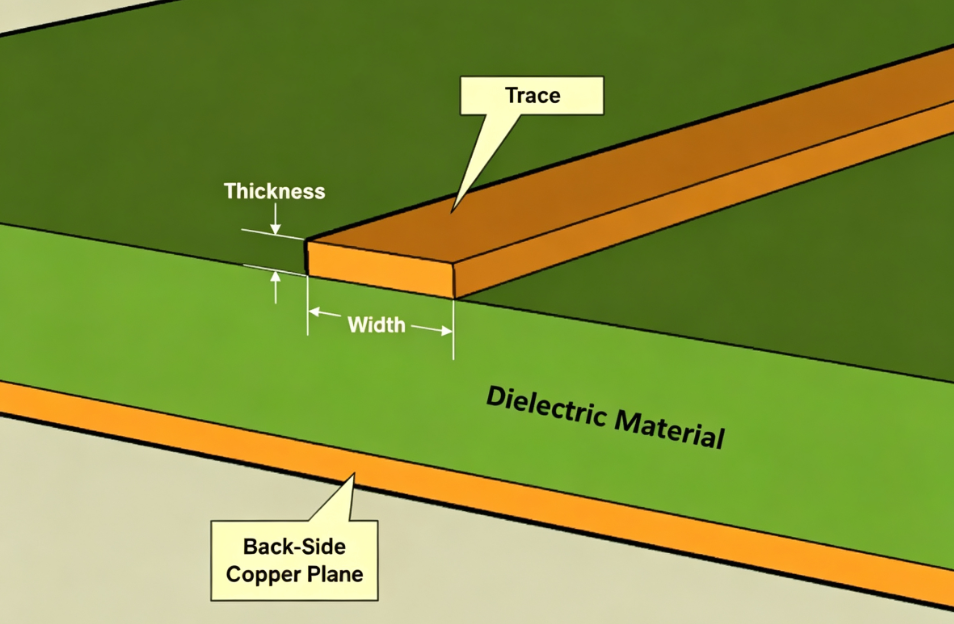
PCB development always starts with a default trace width. However, such a default width is not always suitable for the required PCB, because you need to determine the trace width by considering its current-carrying capability.
Several factors must be considered when determining the correct trace width:
-
Copper thickness – This is the actual trace thickness on the PCB. For high-current PCBs, the default copper thickness is typically about 1 oz (35 µm) to 2 oz (70 µm).
-
Cross‑sectional area of the trace – Higher power requirements on the PCB need traces with larger cross‑sectional areas, which is directly proportional to trace width.
-
Location of the trace – Bottom, top, or inner layer.
How do you design a high‑current PCB?
Digital, RF, and power circuits primarily handle or transmit low‑power signals. For these applications, copper weights of 1‑2 oz carry currents from milliamperes to 1 A or 2 A. Some applications, such as motor control, require currents up to 50 A, which demand larger copper weights and wider traces on the PCB.
The traditional design approach for high‑current requirements is to widen the copper traces and increase the trace thickness to 2 oz. This increases the space requirements on the board as well as the number of layers.
High‑current PCB layout guidelines
These are guidelines for designing and manufacturing high‑current PCBs:
Keep high‑current traces short
Long traces mean higher resistance and, when carrying large currents, result in greater power loss. Since power loss generates heat, board life is reduced. Therefore, it is critical to keep traces that carry high currents as short as possible.
Calculate trace width with appropriate temperature rise
Trace width is a function of variables such as resistance, the current through it, and the allowable temperature rise. By convention, a temperature rise of 10°C above the ambient temperature (25°C) is permitted. If board material and design allow, even a 20°C temperature rise can be tolerated.
Isolate sensitive components from heat
Some electronic components – such as voltage references, analog‑to‑digital converters, and operational amplifiers – are sensitive to temperature changes. When such components are heated, their signals may shift. High‑current boards are known to generate heat, so these components need some degree of thermal isolation from hot spots. You can achieve this by routing board cutouts and providing thermal relief connections.
Remove solder mask
To increase a trace's current capability, you can remove the solder mask that exposes the underlying copper. Additional solder can then be added to the trace, increasing its thickness and reducing resistance. This allows more current to flow through the trace without increasing width or incurring the cost of extra copper thickness.
Use copper pour under high‑current components
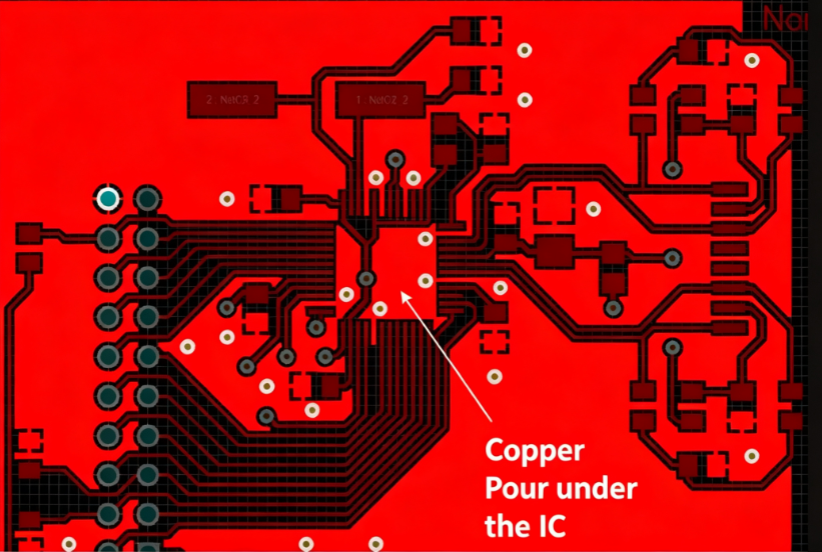
Field‑programmable gate arrays (FPGAs) and processors come in ball‑grid‑array (BGA) and land‑grid‑array (LGA) packages and have high current requirements. To deliver high current, you can place solid polygonal copper pours directly under the chip, then drop vias down and connect to them. You can then connect the copper pours through the vias to thick power traces or power planes.
Use inner layers for high‑current paths
When there is no space on the outer layers of the PCB for thick traces, you can use solid fills in the inner board layers. Next, you can connect to high‑current devices on the outer layers using vias.
Add copper busbars for very high currents
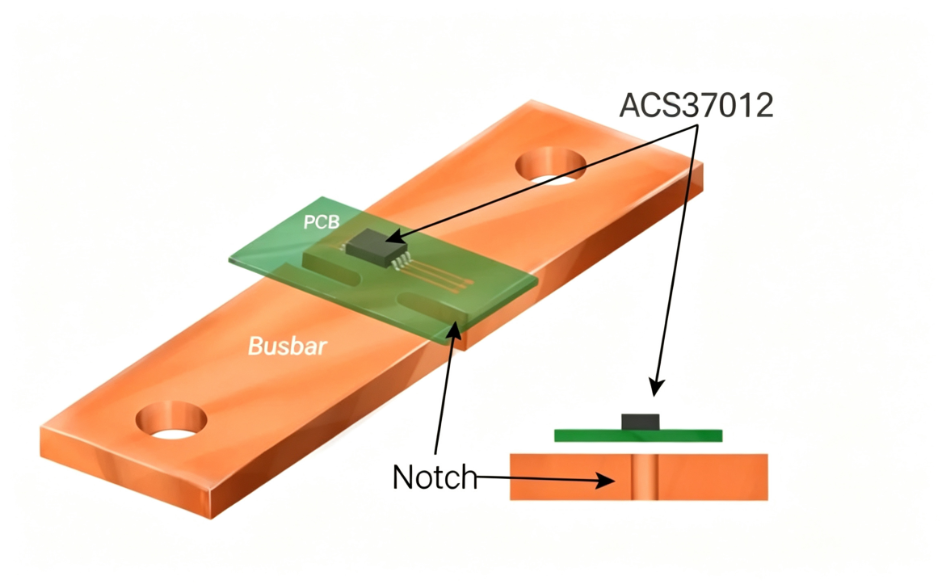
For electric vehicles and high‑power inverters with currents exceeding 100 A, copper traces may not be the best way to transmit power and signals. In such cases, you can use copper busbars that are soldered to PCB pads. Busbars are much thicker than traces and can carry high currents as required without heat issues.
Use via stitching for multiple traces on multiple layers carrying high current
When a trace cannot carry the required current in a single layer, traces can be routed on multiple layers and stitched together. With the same thickness on both layers, this increases the current‑carrying capability.
What is a PCB trace width calculator?
Trace width depends on many factors, such as copper thickness, trace length, and location. It is difficult to manually calculate accurate values. That is why most PCB manufacturing businesses provide tools to calculate trace width.
A PCB trace width calculator is a tool that takes all the factors mentioned above into account to provide accurate values for the required trace width.
According to the IPC‑2221 Generic Standard on Printed Board Design, PCB trace current limits can be further divided into internal conductors and external conductors.
The charts below show the relationships between different variables related to trace width. These variables are trace cross‑sectional area, temperature rise, and maximum current‑carrying capability for external and internal conductors.
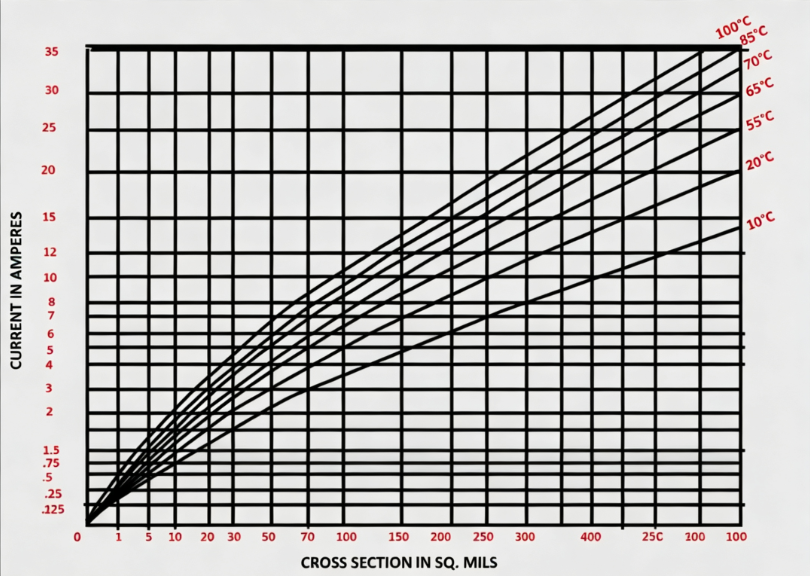
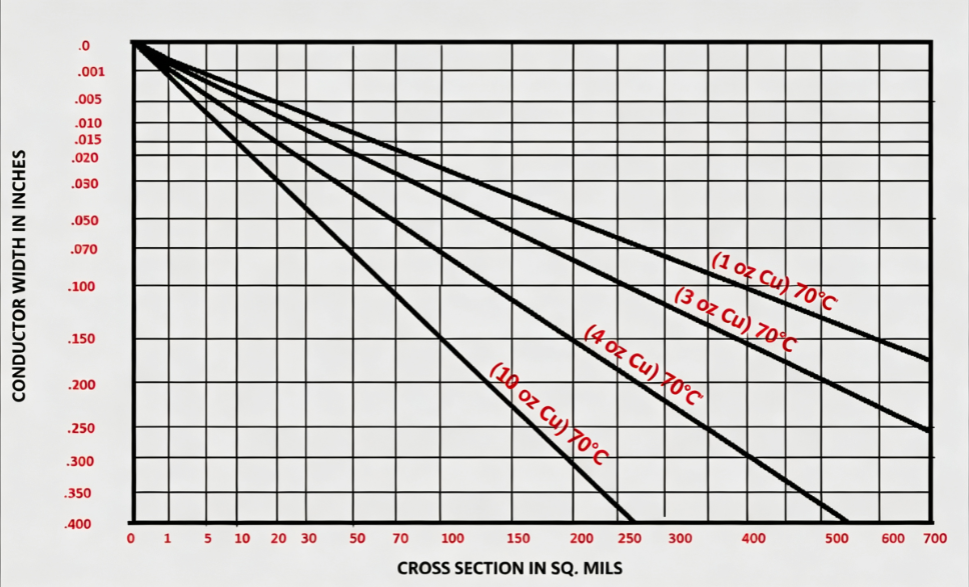
Based on the charts, the formula for calculating current‑carrying capacity is:
I = K · ΔT^0.44 · A^0.75
Where:
-
K = 0.024 for inner layer traces and 0.048 for outer layer traces
-
ΔT = maximum temperature difference in °C
-
A = cross‑sectional area of copper in mil²
-
I = current‑carrying capacity in amperes
Existing PCB trace width calculators are still based on the data in the charts and the formula given above. They serve as handy tools for PCB designers to calculate trace width very precisely. The table below lists the maximum current‑carrying capacity for 2 oz copper with a 10°C temperature rise.
| Maximum current (Amperes) | Minimum trace width for outer layer (mil) | Minimum trace width for inner layer (mil) |
|---|---|---|
| 2 | 19.95 | 20.03 |
| 4 | 66.59 | 66.86 |
| 6 | 134.78 | 135.34 |
| 8 | 222.28 | 223.21 |
| 10 | 327.68 | 329.05 |
Conclusion
Complex factors are at play when determining trace current‑carrying capacity. However, PCB designers can rely on the reliability of trace thickness calculators to help design boards effectively.
Getting the correct trace width and its current‑carrying capability goes a long way toward designing reliable and high‑performance PCBs.