Even the most confident designers often approach RF circuits with trepidation, because they present enormous design challenges and require specialized design and analysis tools. Here are six tips to help you simplify any RF PCB design task and reduce your stress!
Even the most confident designers often approach RF circuits with trepidation, because they present enormous design challenges and require specialized design and analysis tools. Here are six tips to help you simplify any RF PCB design task and reduce your stress!
1. Maintain accurate, precise RF shapes
Serious errors like those described earlier can lead to poor circuit performance or even total failure. To minimize errors, simplify RF design tasks, and boost productivity, PCB design tools can provide import controls for complex copper shapes. For example, you can create usable copper shapes by controlling the layers in a DXF file and remapping them to the CAD electrical system layers (Figure 1).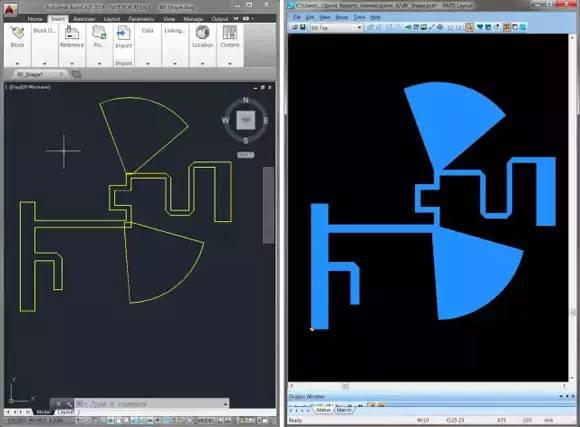
Figure 1: Design tools that allow users to control the DXF import process help reduce human error and mistakes, such as when an imported file cannot be converted to a copper shape due to excessive complexity.
2. Preserve sharp corners
When designing copper shapes for RF and microwave applications, a critical aspect is the ability to create Gerber files with sharp corners. Good PCB design tools simplify this process. For example, drawing a shape with a 50‑mil line often results in a smaller radius compared to using a 50‑mil round aperture. When creating Gerber files, the design tool can automatically convert line widths correctly to obtain sharp corners (Figure 2).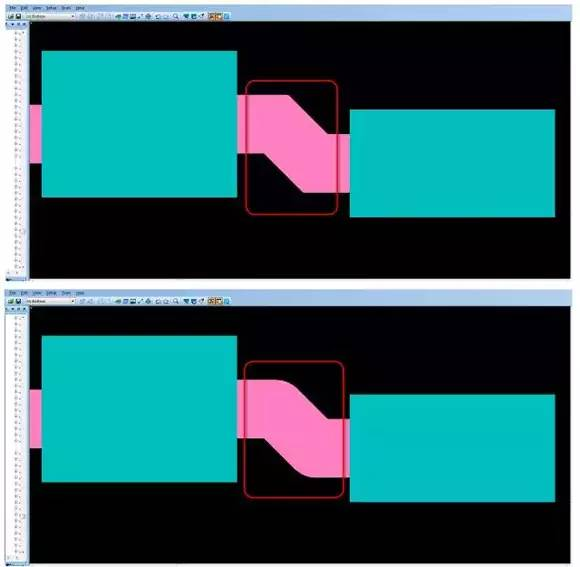
Figure 2: Effective PCB design tools automatically account for the line style used to draw the shape to calculate accurate line widths, helping you easily create sharp corners.
3. Automate chamfer generation
Chamfers are frequently used in RF and microwave circuits to reduce the step discontinuity reactance between feed lines and capacitors, thereby improving MMIC frequency performance. The distance between a 90° corner and its chamfer is critical. Therefore, designers need an automated approach to generate chamfer ratios based on the design specifications. Designers and engineers benefit from PCB design tools that can automatically enforce the required chamfer ratios via design rules, saving time while improving design quality (Figure 3).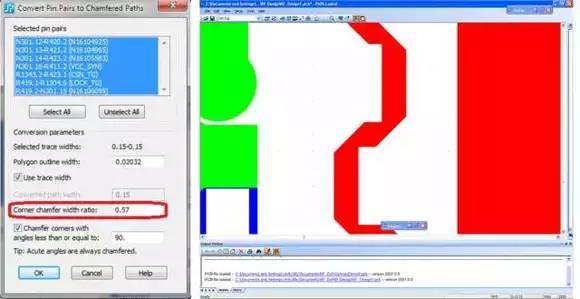
Figure 3: The ability to set chamfer rules streamlines the design process and saves time.
4. Use automation to help lay out coplanar and channel waveguides
Coplanar waveguides and channel waveguides are also common in RF and microwave designs. Creating them manually can be very time‑consuming and error‑prone. Designers need to control the specific distances between traces and vias, as well as between vias, to ensure the circuit meets its performance requirements. Design tools can help here as well, by providing via‑usage controls and automated via placement to reduce complexity and improve quality (Figure 4).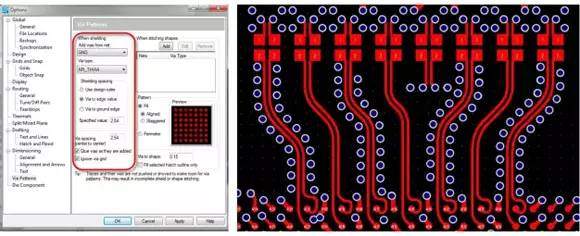
Figure 4: PCB design tools that can control the creation of coplanar and channel waveguide vias help significantly reduce design errors and shorten design time.
5. Use automated stitching vias
Another important aspect of RF design is ensuring proper shielding of areas with vias. Although this task can be done manually, it is extremely time‑consuming. If the PCB design tool can automate this process, design cycle time can be reduced and compliance with all design rules can be ensured. With such tools, designers can specify via pattern generation rules, and the tool takes care of the rest.
6. Use design rules to ensure “right‑by‑design”
PCB design tools that support RF design typically allow setting multiple design rules: via types for different copper areas; which nets the vias themselves need to connect to; the distance from the edge of the copper area to the vias; the spacing between adjacent vias; the via pattern type; and whether a Faraday cage can be created simply by adding vias along the outer edge of the copper area (Figure 5).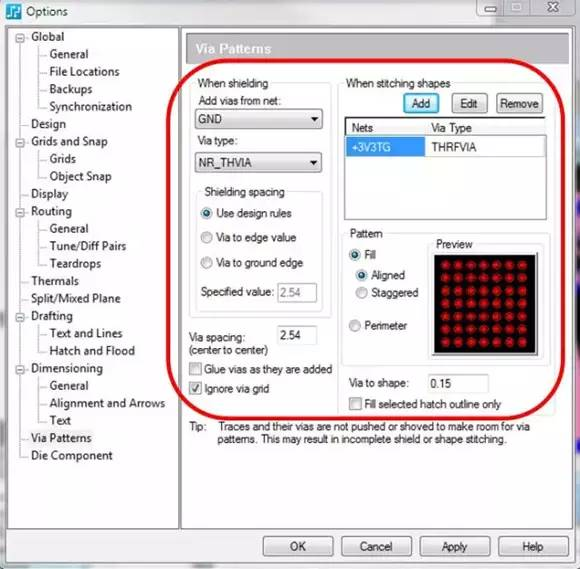
Figure 5: With a PCB design tool that supports RF design, you can set design rules for generating via patterns and automatically enforce these rules in your design, saving you time and ensuring compliance with all your design rules.
About Maxipcb
Maxipcb empowers innovators to turn cutting-edge technologies into reality.We offer one-stop solutions for design, simulation, testing, PCB manufacturing, component procurement and SMT assembly, enabling efficient development, rapid deployment and risk control across the full product lifecycle.
Serving the world in communications, industrial automation, aerospace, automotive, semiconductor and beyond, we build a safer, more connected future together.

