When starting a new design, most time is spent on circuit design and component selection, which often leads to inadequate considerations in the PCB layout and routing phase due to lack of experience.
When starting a new design, most time is spent on circuit design and component selection, which often leads to inadequate considerations in the PCB layout and routing phase due to lack of experience.
Insufficient time and effort devoted to PCB layout and routing may result in manufacturing issues or functional defects when the digital design is translated into a physical product.
So what is the key to designing a reliable circuit board both on paper and in physical form? Let's explore the top 6 PCB design guidelines you need to know to create a manufacturable and functionally reliable PCB.
Fine-Tune Your Component Placement
The component placement stage in PCB layout is both a science and an art, requiring strategic consideration of the main components available on the board.
While this process can be challenging, the way you place electronic components will determine the manufacturability of the board and how well it meets your original design requirements.
There is a general standard order for component placement (e.g., connectors, PCB mounting devices, power circuits, precision circuits, critical circuits, in sequence), and specific guidelines to keep in mind:
- Orientation: Align similar components in the same direction to enable an efficient and error-free soldering process.
- Arrangement: Avoid placing smaller components behind larger ones, as this may cause mounting issues for small components due to the soldering of large ones.
- Organization: It is recommended to place all Surface Mount Technology (SMT) components on the same side of the board and all Through-Hole (TH) components on the top to minimize assembly steps.
One final PCB design guideline to note: using mixed-technology components (TH and SMT) may require additional manufacturing processes, increasing your overall costs.
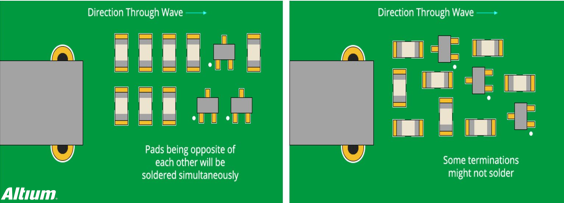
Proper and improper chip component orientation (left: proper; right: improper) - Altium
Notes: Direction Through Wave; Pads being opposite of each other will be soldered simultaneously; Some terminations might not solder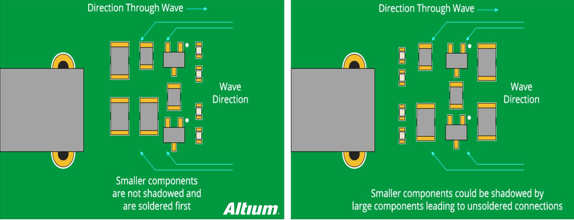
Proper and improper component arrangement (left: proper; right: improper) - Altium
Notes: Wave Direction; Smaller components are not shadowed and are soldered first; Smaller components could be shadowed by large components leading to unsoldered connectionsRational Routing of Power, Ground and Signal Traces
After component placement, proceed to route power, ground and signal traces to ensure a clean and unobstructed path for signals. Keep the following guidelines in mind at this stage:
1) Position Power and Ground Planes
It is always recommended to place power and ground planes inside the board while maintaining symmetry and centering. This helps prevent board warpage, which also affects the accurate positioning of components.
For IC power supply, use a common path for each power rail, ensure a robust and stable trace width, and avoid daisy-chain power connections between components.
2) Signal Trace Routing
Subsequently, connect signal traces as designed in the schematic. Always use the shortest and most direct paths possible between components.
If components need to be fixed horizontally without deviation, route traces horizontally at the component leads on the board, then switch to vertical routing after the leads.
This ensures components remain horizontal during soldering as solder flows. The trace routing method shown in the upper part of the figure is recommended, while the method in the lower part may cause component rotation due to solder flow.
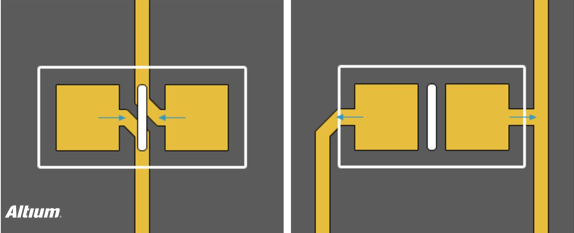
Recommended routing methods (arrows indicate solder flow direction) - Altium
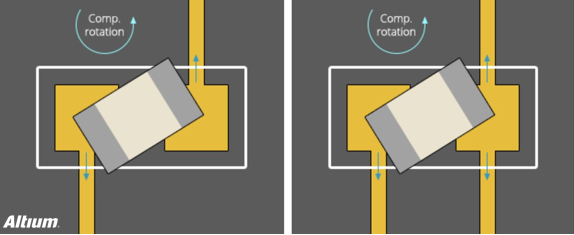
Non-recommended routing methods (arrows indicate solder flow direction) - Altium3) Define Net Widths
Your design may require different nets carrying various currents, which determines the required net width. As a basic requirement, a width of 0.010’’ (10mil) is recommended for low-current analog and digital signals. Traces should be widened when the current exceeds 0.3 amps. A free trace width calculator is available to simplify this conversion.
Effective Isolation
You may have experienced how high voltage and current spikes in power circuits interfere with low-voltage control circuits. To minimize such interference:
- Isolation: Keep power ground and control ground separate for each power rail. If they must be connected on the PCB, ensure the connection is as close to the end of the power path as possible.
- Arrangement: If a ground plane is placed on an inner layer, provide a low-impedance path to reduce the risk of power circuit interference and protect control signals. The same guideline applies to separating digital and analog circuits.
- Coupling: To reduce capacitive coupling caused by large ground planes and traces routed above/below them, only cross analog ground with analog signal traces.
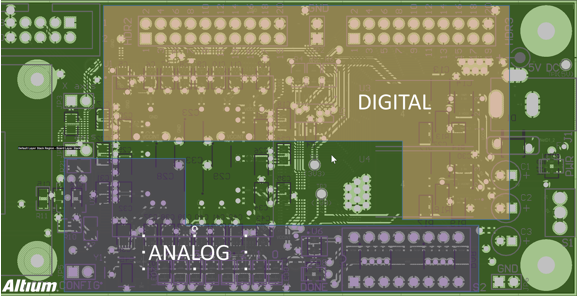
Component isolation example (digital and analog) - QovoAddress Thermal Issues
Have you ever experienced degraded circuit performance or even board damage due to thermal issues? Many designers face problems caused by neglecting heat dissipation. Here are guidelines to address thermal issues:
1) Identify Problematic Components
First, identify components that dissipate the most heat on the board. This can be done by checking the thermal resistance rating in component datasheets, then transferring generated heat in accordance with recommended guidelines. Of course, heat sinks and cooling fans can be added to keep component temperatures low, and critical components should be kept away from high heat sources.
2) Add Thermal Relief Pads
Thermal relief pads are essential for manufacturing feasible boards and critical for wave soldering of high-copper-content components and multilayer boards. Due to the difficulty of maintaining process temperatures, thermal relief pads are always recommended for through-hole components to slow down heat dissipation at component pins and simplify the soldering process.
As a general rule, use thermal relief pad connections for any through-holes or vias connected to ground or power planes. In addition to thermal relief pads, teardrops can be added at pad trace junctions to provide extra copper/metal support, reducing mechanical and thermal stress.
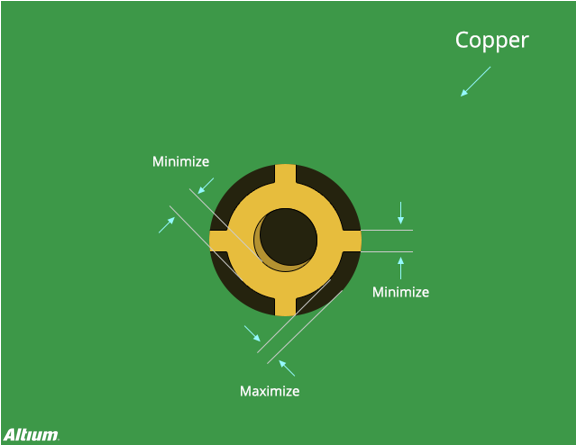
Typical thermal relief pad connection method - AltiumAn Overview of Thermal Relief Pads
Engineers responsible for manufacturing processes or SMT technology in many factories often encounter soldering defects such as solder voids, dewetting, cold soldering and non-wetting. No matter how process conditions or reflow oven temperatures are adjusted, a certain rate of soldering failures persists. Why is this the case?
Excluding component and PCB oxidation, most such soldering defects stem from PCB layout design flaws. The most common flaw is connecting some component pins to large copper areas, leading to soldering failures after reflow soldering. Similar issues may cause cold soldering or solder bridging in hand-soldered components, and some components may even be damaged due to overheating during soldering.
Large copper areas are often used for power (Vcc, Vdd, Vss) and ground (GND) in PCB design, and these areas are usually directly connected to pins of control ICs and electronic components.
Unfortunately, heating large copper areas to solder melting temperature takes more time (slower heating) and dissipates heat faster than individual pads. When large copper traces are connected to small components (e.g., resistors, capacitors) on one end and other components on the other, soldering problems easily occur due to inconsistent solder melting and solidification times. Insufficient preheating in improper reflow temperature profiles may cause cold soldering at component pins connected to large copper areas due to inadequate heating.
During hand soldering, component pins connected to large copper areas dissipate heat too quickly to complete soldering within the specified time. The most common defects are solder bridging and cold soldering, where solder only adheres to component pins but not PCB pads, resulting in spherical solder joints in appearance. Worse still, operators may increase soldering iron temperature or extend heating time unknowingly to complete soldering, causing component damage due to overheating beyond thermal limits.
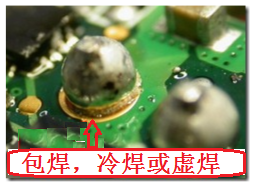
Solder bridging, cold soldering and voidsOnce the root cause is identified, solutions can be implemented. Thermal relief pad design is commonly required to solve soldering problems caused by connecting component pins to large copper areas.
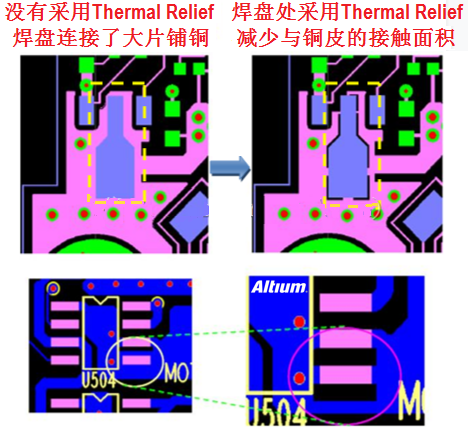
Comparison of PCBs with and without thermal relief pads (Altium)
Notes: Left - Pad connected to large copper area without thermal relief; Right - Reduced contact area between pad and copper area with thermal relief pads, which greatly limits heat loss at the pad and achieves better soldering results.Check Your Work
It is easy to find problems at the end of a design project when all parts are combined for manufacturing, leading to overwhelming issues. Therefore, double and triple checking your design at this stage can determine manufacturing success or failure.
To facilitate quality control, always start with Electrical Rule Check (ERC) and Design Rule Check (DRC) to verify that the design fully complies with all rules and constraints. These tools enable easy inspection of clearance, trace width, common manufacturing settings, high-speed requirements, short circuits, etc.
When ERC and DRC yield error-free results, check the routing of each signal trace from schematic to PCB, verifying one trace at a time to ensure no information is missing. Additionally, use the probing and masking functions of your design tool to ensure the PCB layout matches the schematic.
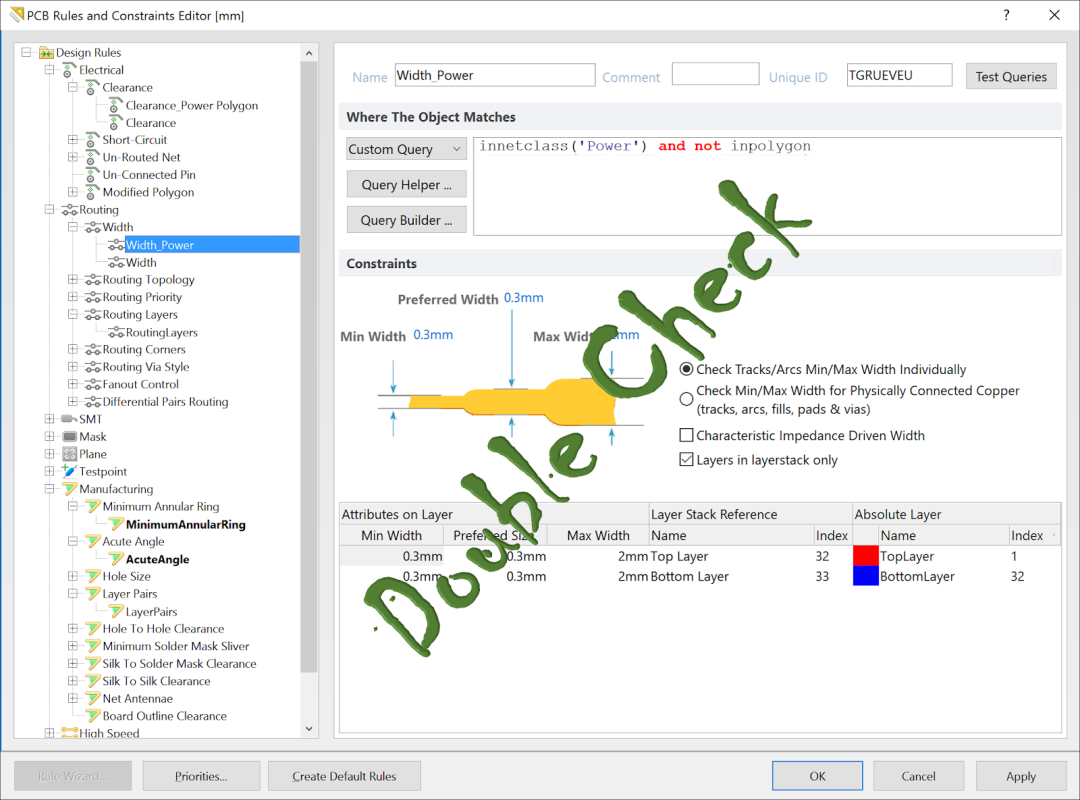
PCB Rules and Constraints Editor interface (mm) - Detailed check of design, PCB and constraint rulesConclusion
With these 5 essential PCB design guidelines for every PCB designer, following these recommendations will enable you to skillfully design powerful, manufacturable and high-quality printed circuit boards.
Good PCB design practices are critical to success, and these design rules lay the foundation for continuous improvement in all design practices.
About Maxipcb
Maxipcb empowers innovators to turn cutting-edge technologies into reality.
We offer one-stop solutions for design, simulation, testing, PCB manufacturing, component procurement and SMT assembly, enabling efficient development, rapid deployment and risk control across the full product lifecycle.Serving the world in communications, industrial automation, aerospace, automotive, semiconductor and beyond, we build a safer, more connected future together.

