In PCB design, we often encounter the term "teardrop", but many designers are not clear about its meaning, let alone how to add it to PCB designs. Below is a detailed explanation of the functions and addition methods of teardrops.
In PCB design, we often encounter the term "teardrop", but many designers are not clear about its meaning, let alone how to add it to PCB designs. Below is a detailed explanation of the functions and addition methods of teardrops.
What Are PCB Teardrops?
PCB teardrops refer to the fillet or tapered transition structures added at the connection points between PCB traces and pads/vias. They resemble teardrops in shape, gradually transitioning from the width of the trace to the size of the pad or via hole.
Functions of Teardrops
- Mechanical reinforcement: Prevent the connection points between traces and pads/vias from breaking when the circuit board is subjected to strong external impact. Additionally, teardrops enhance the overall aesthetic appearance of the PCB.
- Manufacturing and soldering protection:
- Protect pads during soldering, avoiding pad detachment caused by repeated soldering operations.
- Prevent uneven etching during PCB production and cracks resulting from via misalignment.
- Signal integrity optimization: Smooth impedance transitions, reducing abrupt impedance changes. This avoids signal reflection caused by sudden narrowing of trace width during high-frequency signal transmission, enabling a smooth transition between traces and component pads.
Methods to Add Teardrops (Allegro PCB Software)
-
Open the Allegro PCB software, then select the following options in sequence via the menu bar:
Route -->
Gloss -->
Parameters
Personally, I only select the options highlighted in the figure below:
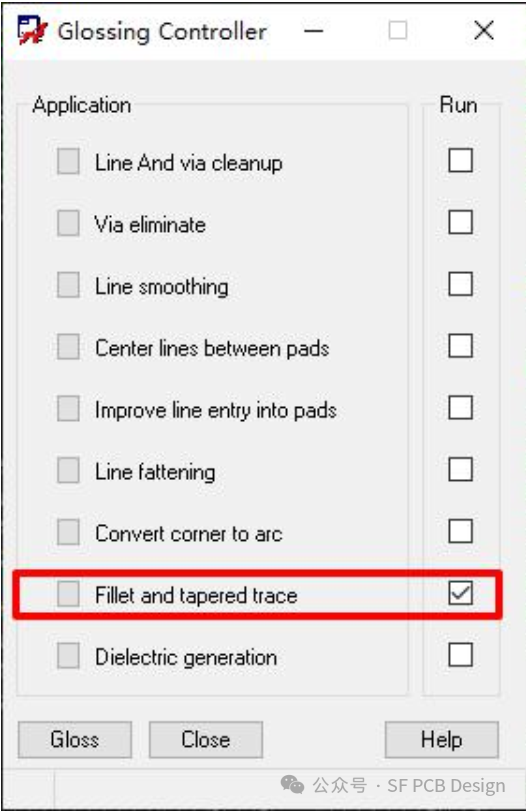 Glossing Controller parameter settings window (Allegro PCB)
-
Click
Gloss to complete the teardrop addition. The effect is shown in the figure below:
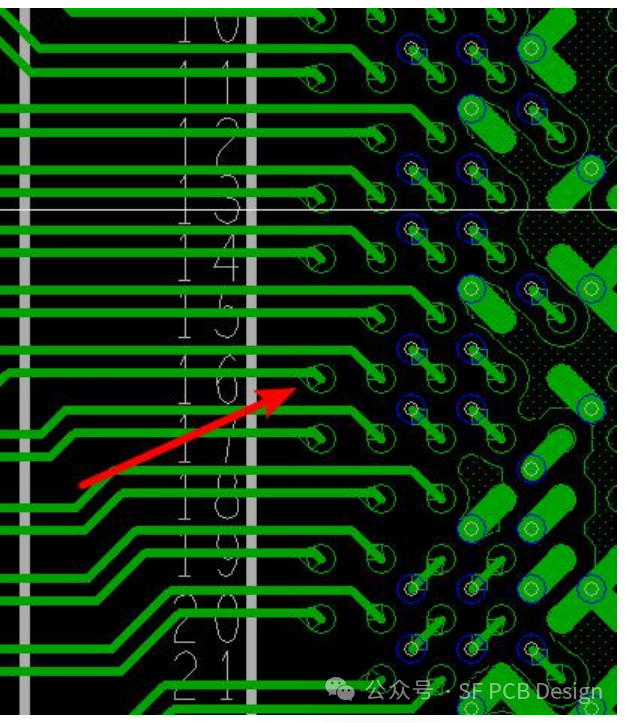 PCB effect diagram after teardrop addition
Important Notes
- It is best to add teardrops before generating GERBER files.
- If you need to modify the board, delete the teardrops first to avoid affecting the modification operation.
- Whether adding or deleting teardrops, ensure all trace layers are opened first. Otherwise, the operation will not be executed on the unopened trace layers.
- If you do not want the software to automatically adjust your routed traces, it is recommended to uncheck the circled items in the parameter settings window:
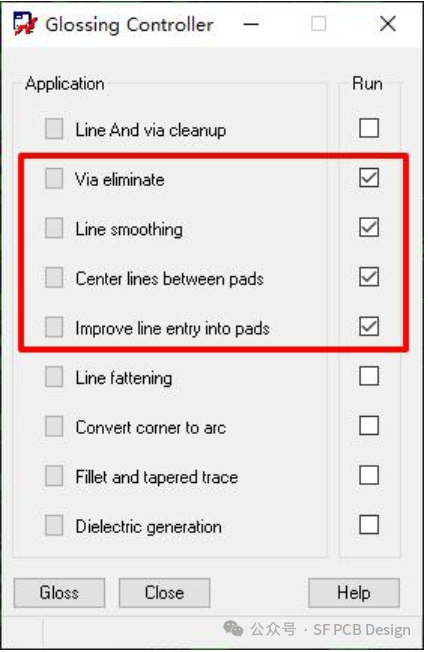 Glossing Controller parameter settings window (items to uncheck for preserving original routing)
About Maxipcb
Maxipcb empowers innovators to turn cutting-edge technologies into reality.
We offer one-stop solutions for design, simulation, testing, PCB manufacturing, component procurement and SMT assembly, enabling efficient development, rapid deployment and risk control across the full product lifecycle.Serving the world in communications, industrial automation, aerospace, automotive, semiconductor and beyond, we build a safer, more connected future together.

 Glossing Controller parameter settings window (Allegro PCB)
 PCB effect diagram after teardrop addition
 Glossing Controller parameter settings window (items to uncheck for preserving original routing)